

A lot of advisory firms are in the same spot right now. The website is live, the contact form works, content is publishing, and traffic is coming in from search, referrals, or paid campaigns. But nobody can say with confidence which pages attract qualified prospects, which forms submit, or whether a compliance-sensitive download is helping or hurting conversion.
That gap matters. For a financial advisor, analytics isn't just about traffic. It's about knowing whether the website supports compliant lead generation, whether prospects are engaging with the right content, and whether marketing dollars are moving people toward a consultation instead of into a dead end.
Table of Contents
- Why Google Analytics Is a Must Have for Your Firm
- Creating Your GA4 Property and Data Stream
- Installing the Google Tag on Your Website
- Verifying Your Data and Tracking Key Events
- Advanced Setup for Advisor Websites
- Frequently Asked Questions about GA4 Setup
Why Google Analytics Is a Must Have for Your Firm
An advisory website has a job to do. It needs to attract the right visitor, build trust quickly, and move that visitor toward a compliant next step such as a meeting request, a contact form, or a content download. Without analytics, that process turns into guesswork.
Google Analytics 4 matters because it tracks behavior at the interaction level, not just at the visit level. That difference is important for firms that need visibility into actions like form submissions or document downloads instead of broad traffic summaries. According to this overview of GA4's transition and event model, Google Analytics 4 replaced Universal Analytics on July 1, 2023, making it the mandatory platform, and it uses an event-based data model that's well suited to tracking specific user interactions that matter in advisory lead generation.
For financial advisors, that shift is more than a software update. It changes how performance gets measured. A generic website owner might care mostly about page views. An advisor needs to know whether a retirement planning page leads to a consultation request, whether a market commentary PDF attracts the right prospects, and whether users abandon the process before reaching a compliant intake step.
Practical rule: If the website is supposed to generate leads, every meaningful prospect action should be measurable.
That also makes analytics a compliance issue. If onboarding or lead forms aren't tracked correctly, a firm can't accurately evaluate how prospects move through the website. If auto-tracked interactions collect more than they should on a regulated site, reporting can become messy fast. Setup quality matters.
A good GA4 implementation helps answer practical questions such as:
- Which pages start engagement: The homepage isn't always the first touch. Often, a niche service page or educational article introduces the firm.
- Which content signals intent: A visitor who views a service page and then downloads a planning guide behaves differently than someone who reads one blog post and leaves.
- Which campaigns create qualified actions: Traffic alone doesn't prove value. Advisors need to connect marketing activity to consultation requests and other defined actions.
- Which workflows need attention: If prospects reach a form but don't complete it, that's a website or messaging issue, not a traffic issue.
Firms that treat analytics as part of their marketing system make better decisions. Firms that treat it as an afterthought usually end up debating opinions.
For teams building a broader growth strategy, this aligns closely with realities of digital marketing in financial services, where compliant execution and measurable lead flow have to work together.
Creating Your GA4 Property and Data Stream
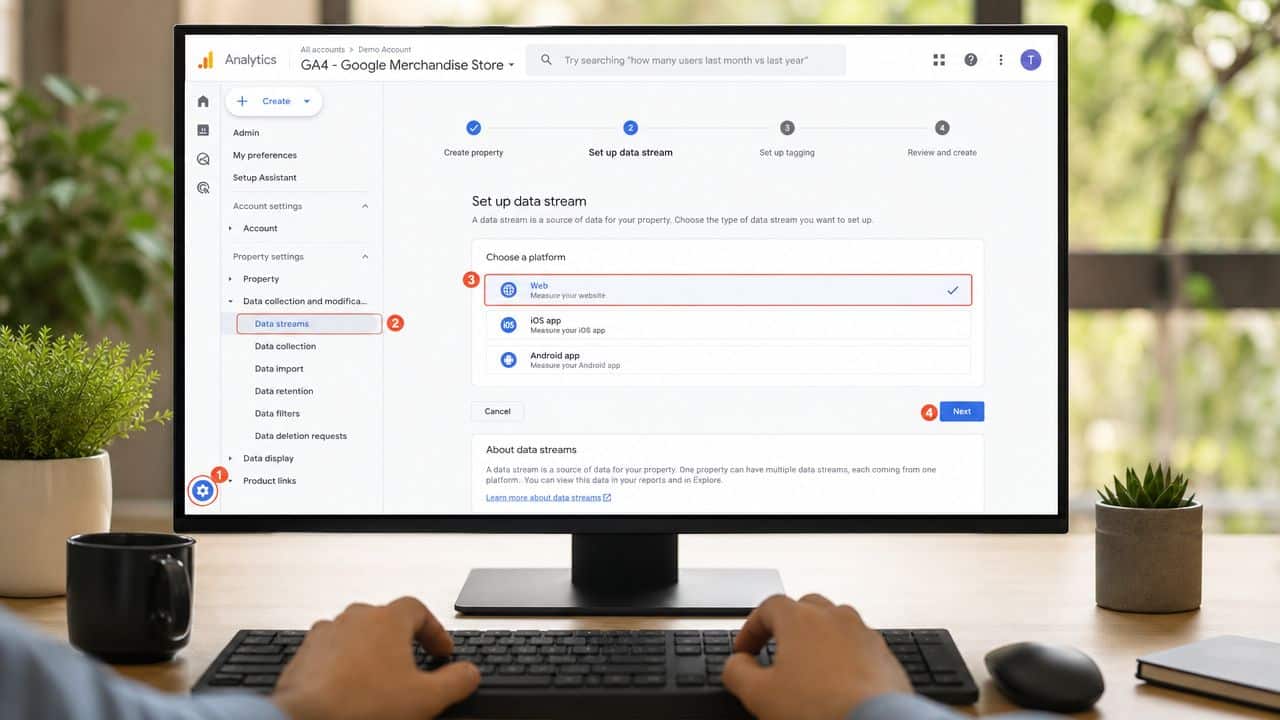
The first real setup step happens inside the admin area. Here, the firm creates the container that will receive website data and defines how reporting is organized.
Understand the account structure first
A lot of confusion starts here. The admin interface separates setup into Account and Property columns. That structure matters because the account is the umbrella level, while the property is the specific setup for a site or environment. This walkthrough of the admin layout notes that the interface is divided into those two columns and that the user must first select the target account, then create the property under the Property column.
For an advisory firm, the cleanest setup is usually one account for the organization and a separate property for each website that needs distinct reporting. That keeps brand-level reporting organized and avoids blending separate business lines.
Create the property the right way
When creating the property, Google asks for business details before the platform allows completion. Those choices aren't just cosmetic. They influence the reporting experience and guide the default setup toward the firm's stated goals.
According to this video walkthrough of GA4 property creation, the setup requires selecting a business category, business size, and objectives such as "Generate leads" before the property and web data stream can be created. For advisors, choosing the objective that aligns with lead generation is the practical move because it keeps reporting focused on prospect actions rather than retail-style commerce behavior.
A straightforward workflow looks like this:
- Select the correct account so the property lives under the right organization.
- Click Create Property in the property column.
- Name the property clearly using the firm name or site name.
- Choose the business category and size accurately enough to reflect the firm.
- Pick objectives that match the website's job, usually lead generation for advisory firms.
- Finish creation and move directly into the web stream setup.
A clear naming convention prevents reporting mistakes later. "Main website," "advisor microsite," and "staging" shouldn't live under vague labels.
For firms that need client-facing dashboards later, it's useful to think ahead about how reporting will be consumed. A platform such as Oviond's GA4 integration can be part of that reporting layer once clean GA4 data is flowing, especially when leadership wants marketing visibility without digging through raw analytics screens.
Set up the web data stream
After the property is created, the next step is the web data stream. This is the source that sends website behavior into the property. During this step, GA4 generates the site's Measurement ID, which is the identifier needed for installation.
Google's documentation on web stream setup confirms that the Measurement ID for a GA4 web stream always begins with G- followed by alphanumeric characters. That ID is what connects the site to the property, whether the installation happens through code, a plugin, or a tag management layer.
At this point, the firm should record three things internally:
- The property name
- The stream name
- The Measurement ID
Those details sound minor until a team manages multiple domains, campaign landing pages, or advisor sub-brands. Then they become the difference between a clean implementation and a reporting mess.
Installing the Google Tag on Your Website
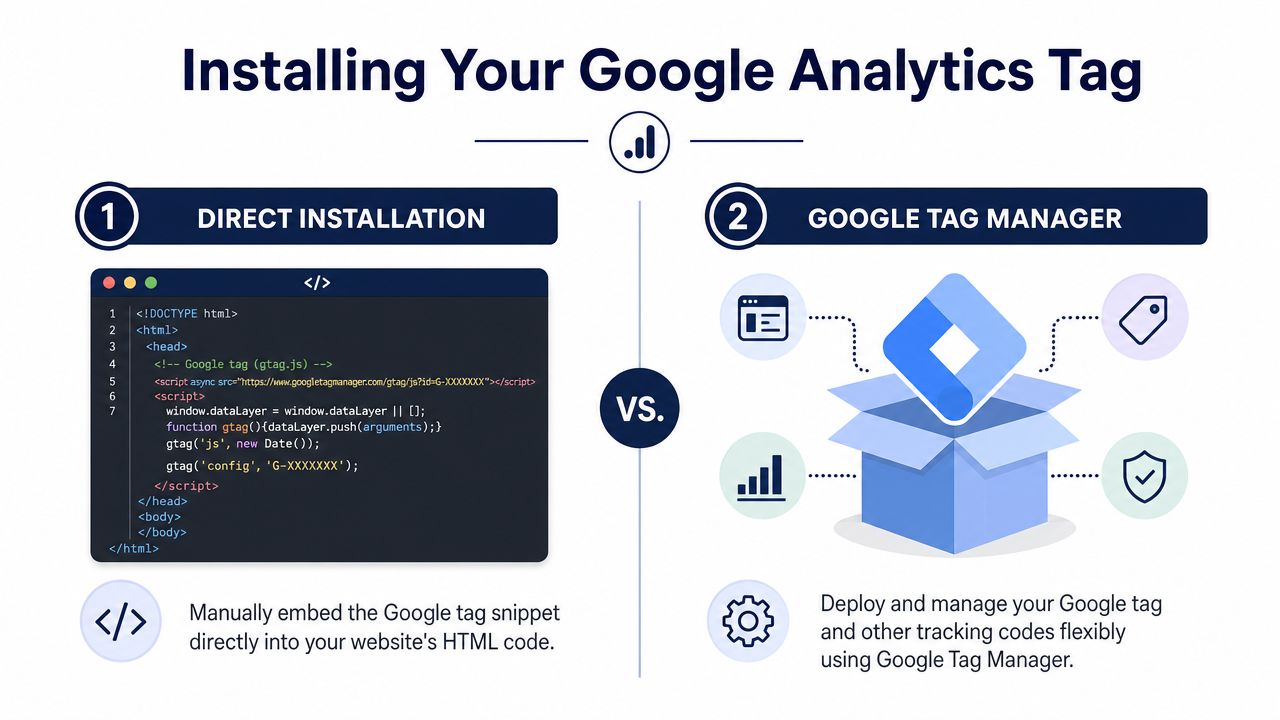
At this stage, many firms overcomplicate the process. There are really two practical paths. One is direct installation on the website. The other is deployment through a tag management layer. Both can work. The right choice depends on how much flexibility the firm wants later.
Option one direct installation
Direct installation is the simpler path. The site owner or developer places the Google tag on the site, usually in the website header or through a content management system plugin. This method works well for firms with a standard brochure-style website and a limited need for future tracking changes.
This setup guide for adding a website to analytics explains that activating data collection requires a Measurement ID and its associated JavaScript snippet placed after the <head> tag on every page, either manually or through a CMS plugin. It also notes that verification is mandatory because failure to confirm installation can result in a 0% data capture rate.
That requirement has a direct implication for financial advisors. If the tag isn't installed sitewide, the firm may think traffic is low or forms aren't converting when the underlying problem is missing data.
For WordPress-based advisory websites, direct installation is often the easiest route. The same setup guide notes that users can install the tag through a plugin rather than editing code manually, which reduces the chance of breaking site templates.
Option two Google Tag Manager
A tag management layer is the better choice when the website will need more than baseline tracking. If the marketing team plans to track consultation clicks, form completions, PDF downloads, call taps on mobile, or segmented conversion paths, this approach usually gives the firm more control.
The trade-off is complexity. Someone has to understand how tags, triggers, and publishing work. That isn't impossible, but it does require process discipline. A half-configured tag management setup is worse than a simple direct install because it creates the illusion of sophistication without reliable output.
A useful decision point is this:
| Method | Best fit | Main advantage | Main limitation |
|---|---|---|---|
| Direct install | Simpler websites with limited tracking needs | Faster setup and less technical overhead | Harder to expand cleanly later |
| Tag management | Firms planning advanced event tracking | Better flexibility for future marketing measurement | More setup discipline required |
What works better for advisors
For many advisory firms, the best answer depends on who will maintain the website after launch.
- Choose direct installation if the site is relatively simple, the team wants the fastest route live, and reporting needs are limited to baseline traffic plus a few important events.
- Choose tag management if the firm expects ongoing campaign testing, event updates, multiple conversion points, or frequent changes without touching site code.
- Choose one installation path only because mixing methods creates confusion and can distort reporting.
Clean tracking beats clever tracking. One reliable implementation is better than two overlapping ones.
For teams managing ongoing page updates, forms, and content assets, analytics setup should sit alongside broader website content and management responsibilities. The website, the forms, and the tracking layer need to stay aligned. If one changes and the others don't, data quality slips quickly.
Verifying Your Data and Tracking Key Events
Installing the tag is only the midpoint. The main question is whether data is arriving correctly and whether the platform is tracking the actions the firm cares about.
Start with the Real-time report
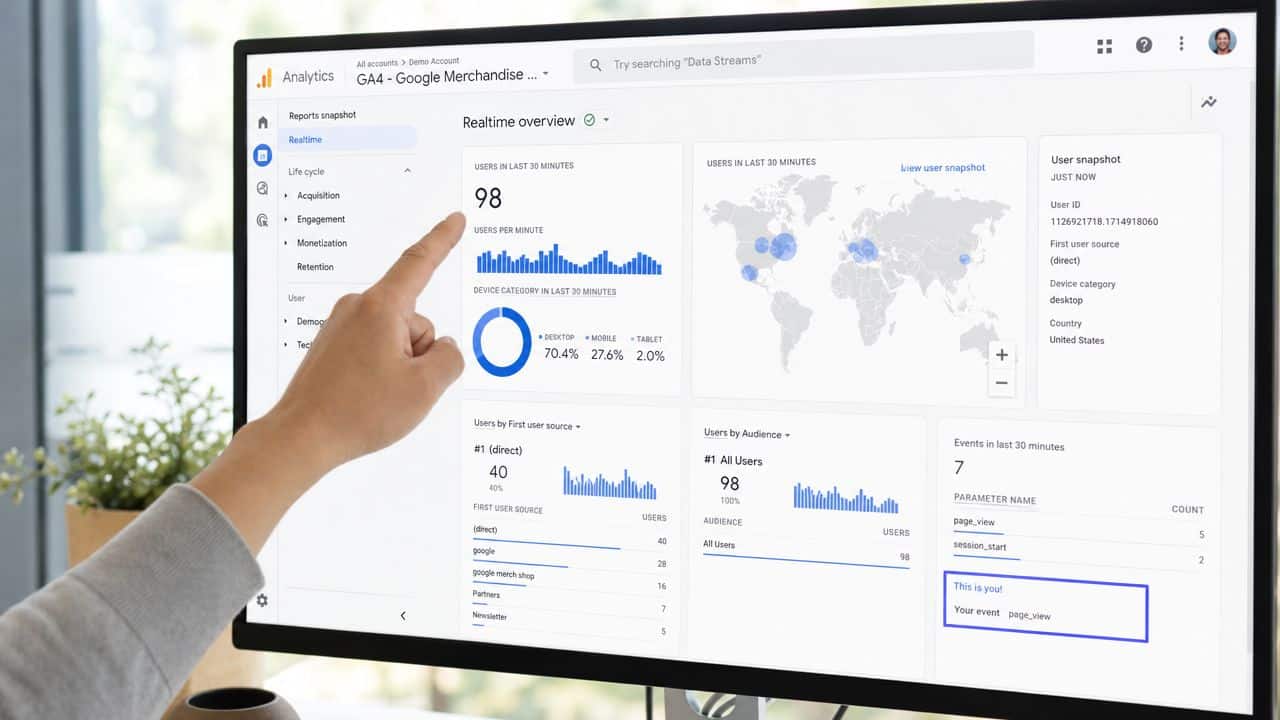
The first check should happen immediately after installation. Open the website in a browser, visit several pages, and then open the Real-time report in GA4. The visit should appear there quickly. If it doesn't, the firm shouldn't move on to reporting or conversion setup yet.
A video explanation of common GA4 setup issues notes that a common pitfall is failing to verify the installation through the Real-time report, which leads to tracking failures. For regulated sites, that same source also notes that Enhanced Measurement may need to be disabled before custom compliant event tracking is configured.
A practical verification routine looks like this:
- Visit the homepage and confirm an active user appears.
- Click through a few important pages such as services, about, and contact.
- Submit a test form if the environment allows it or test on a staging-safe equivalent.
- Check whether the expected events appear in Real-time.
- Pause if anything looks inconsistent instead of building reports on bad data.
If the site shows no activity, the issue is usually installation related. The tag may be missing, misplaced, or not deployed on all pages.
Handle Enhanced Measurement carefully
Generic tutorials often tell users to leave every default setting on. That advice doesn't always fit a regulated website.
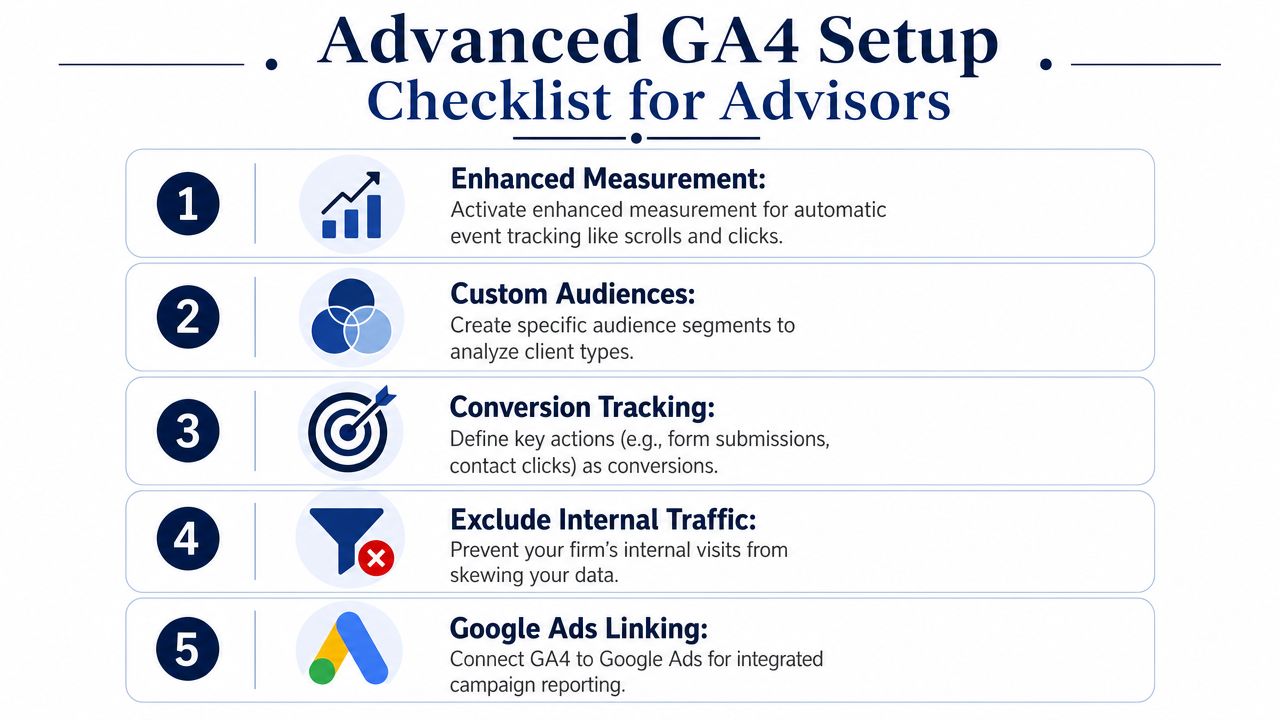
Enhanced Measurement can automatically capture interactions such as scrolls, outbound clicks, and site search behavior. That can be useful on many websites, but an advisory firm has to ask a more important question. Should every auto-tracked interaction be collected before compliance reviews the setup?
For many firms, the answer is no.
The safest approach on a regulated site is to decide what should be tracked before allowing automatic collection to run unchecked.
That doesn't mean avoiding measurement. It means building measurement intentionally. If a contact flow, scheduler, secure portal link, or form experience has compliance implications, custom event planning usually produces cleaner data than broad default collection.
Track the actions that matter
Once verification is complete, the firm should identify a short list of prospect actions that represent real business intent. Not every click deserves attention. A good advisory setup usually focuses on a handful of meaningful events.
Examples include:
- Contact form submission on a general inquiry page
- Consultation request completion for a prospect meeting workflow
- Phone number click from mobile visitors
- Email link click when users contact the firm directly
- Document download for an approved educational resource
The point isn't to create a long event inventory. The point is to measure the steps that signal movement toward a client relationship.
For firms that want to connect anonymous website behavior with stronger visit attribution logic, resources on SourceLoop attribution strategies can help sharpen the thinking around identification and intent signals. The key is to apply that thinking in a way that remains appropriate for the firm's compliance posture and privacy practices.
A lean setup usually outperforms a bloated one. Track the events that matter, verify them, and make sure each one maps to a real decision the firm intends to make.
Advanced Setup for Advisor Websites
Once the property is collecting clean data and core events are in place, the next step is refinement. At this point, a basic implementation becomes useful for operational decisions.
Clean up the data before making decisions
Most advisor websites have internal traffic. Team members check pages, test forms, review articles, and click around before compliance approval. If those visits remain in reporting, engagement metrics stop reflecting prospect behavior and start reflecting office habits.
A professional-grade setup should include an internal traffic exclusion process. The specific method depends on the firm's technical environment, but the purpose stays the same. Reports should reflect visitors the business is trying to influence, not employees checking the homepage.
A useful advanced checklist includes:
- Exclude internal visits so advisors and staff don't distort engagement data.
- Review key forms regularly after site edits or plugin changes.
- Check event naming discipline so reports stay understandable over time.
- Document changes any time tracking is adjusted.
Data quality usually breaks in maintenance, not in the initial setup.
Connect traffic data to business context
Traffic data becomes more valuable when it is paired with search visibility and campaign context. A strong next step is linking search performance insights so the firm can see which pages attract searchers and how those visits behave after arriving.
For advisory firms, this often reveals useful distinctions. One article might generate broad interest but little action. Another service page might attract fewer visitors yet produce stronger lead intent. That difference shapes content strategy, landing page priorities, and even how advisors position their specialties.
A practical maturity model looks like this:
| Focus area | Basic setup | Advanced advisor setup |
|---|---|---|
| Traffic visibility | Sees visits and page views | Sees which traffic sources lead to meaningful actions |
| Lead measurement | Counts form activity broadly | Distinguishes high-intent actions from low-value clicks |
| Internal accuracy | Mixed visitor data | Filters internal use from prospect behavior |
| Search insight | Limited view of discovery | Connects content visibility to downstream engagement |
Another useful refinement is audience segmentation. Instead of looking at all visitors as one pool, the firm can compare users who visit planning pages, retirement pages, business owner content, or banking-related services. That creates a better picture of which topics attract serious prospects.
Treat consent as part of implementation
Cookie consent often gets treated like a design add-on. It isn't. For advisory firms, consent belongs inside the analytics plan from the start because privacy expectations and compliance standards affect how data should be collected.
That means the website, consent settings, and analytics configuration should all support the same policy stance. If the site promises one thing and the tracking setup does another, the issue isn't marketing performance. It's governance.
A strong compliance-aware posture usually includes:
- Clear consent language that matches the firm's actual data practices
- A documented approach to what gets tracked before and after consent
- Periodic reviews after website redesigns, new landing pages, or form changes
This is also where firms should revisit Enhanced Measurement decisions made earlier. Some advisors may choose to enable select auto-tracked interactions later, once they understand what each event captures and how it fits the firm's review process. Others may prefer a narrower custom-event approach. Either choice can work if it's deliberate and documented.
For firms asking how to add a site to Google Analytics in a way that helps business development, this is the difference-maker. Setup isn't finished when data appears. Setup is finished when the data is clean, defensible, and tied to real acquisition decisions.
Frequently Asked Questions about GA4 Setup
How should an advisory firm organize accounts properties and streams
Use the account as the top-level container for the organization. Then use separate properties for websites or distinct environments that require separate reporting. A web data stream belongs inside the property and represents the actual website sending data.
If the firm has one primary website, the structure stays simple. If it has multiple brands, regional sites, or separate campaign environments, the structure should stay intentional from the beginning so reports don't turn into a cleanup project later.
How should access be shared with a marketing team or agency
Don't share a personal login. Give users access inside the analytics platform based on the role they need. That keeps permissions controlled and makes it easier to remove access later if staffing or vendor relationships change.
For regulated firms, access management should be documented just like any other system with marketing or reporting implications. The cleaner the permission structure, the easier it is to maintain oversight.
What happens to old Universal Analytics data
Universal Analytics stopped collecting new data when GA4 became the required platform, so historical reporting doesn't continue automatically in the new setup. Old reporting and new reporting should be treated as separate eras rather than one continuous data set.
That means firms shouldn't expect a fresh GA4 property to contain legacy website history. From an operating standpoint, the important task is building a clean baseline now so future decisions rely on consistent data.
Is the Measurement ID the same thing as the tracking code
No. The Measurement ID is the identifier for the web stream, and it starts with G-. The tracking code is the JavaScript snippet or deployment method that uses that ID to send data from the site into the property.
A lot of installation issues happen when teams save the ID but never confirm that the actual tag is present on the site.
What's the biggest mistake during setup
The biggest mistake is assuming installation equals working data. It doesn't. A site can look fully configured and still fail to track key interactions if the code isn't firing correctly or if events haven't been tested.
That is why the process of how to add a site to Google Analytics should always include verification, event review, and a compliance check before reports are used for marketing decisions.
Advisor Momentum helps financial advisors, RIAs, and banking teams build compliant digital marketing systems that do more than look good. If a firm needs help setting up Google Analytics, tracking lead generation cleanly, or aligning website performance with regulated growth goals, Advisor Momentum is built for that work.
