
The typical advisory firm owner reaches the same point. The demos start blending together, the sales decks all sound polished, and the core question gets harder, not easier, to answer: which CRM for financial advisors will fit the way the firm works on Monday morning?
That question matters because CRM has already moved from optional back office software to core operating infrastructure across the advisory industry. In PLANADVISER's coverage of the 2025 T3/Inside Information survey, 91.08% of surveyed advisory firms said they use CRM tools, up from 86.33% in 2025, and Orion Redtail was used by 42.53% of respondents, compared with 26.32% in 2025. A separate 2021 RIA technology survey found CRM systems were already the most popular technology solution among RIAs, with 53% of firms using one, while roughly 33% of investment advisory firms with over $100 million in AUM still did not use CRM software. That history says one thing clearly, CRM is no longer a sidecar. It's the operating system for client tracking, workflow control, and service consistency. PLANADVISER coverage of the 2025 T3 and Inside Information survey
| Platform type | Best fit | Typical tradeoff |
|---|---|---|
| Advisor-focused CRM | Fast adoption, cleaner workflows, simpler training | Less enterprise customization |
| Enterprise general-purpose CRM | Deep tailoring, complex permissions, broad ecosystem | Higher cost and heavier implementation |
| Bank-integrated CRM | Fits larger institutional stacks and custody workflows | More dependency on internal tech teams |
The smartest buyers stop asking, “What features does it have?” and start asking, “What work does it remove?” If a CRM doesn't reduce manual follow-up, preserve clean household records, and keep service history visible to the team, it's just another login. For a useful lens on pipeline and lead discipline, it's worth pairing CRM thinking with B2B demand generation strategies, because the same process rigor that supports marketing also supports advisor operations.
Table of Contents
- What an Advisor CRM Has to Do in 2026
- The Nine Functional Categories That Separate Real Advisor CRMs
- Three Vendor Archetypes and Where Each One Wins
- Migration, Implementation, and the Adoption Problem Nobody Talks About
- Matching the Right Platform to Your Firm Type
- Pricing, Hidden Costs, and a Simple ROI Model
- Next Steps, Action Plan, and Common Questions
What an Advisor CRM Has to Do in 2026
A firm owner sitting in front of four demos does not need another generic feature list. The question is whether the system can hold together the daily work of an advisory practice without creating more admin than it removes. A serious CRM for financial advisors has to behave like a service hub, not a contact database.
The core job is relationship control
That starts with householding. Advisors do not serve isolated contacts. They serve families, business owners, accountants, attorneys, and multi-generational relationships that need to be mapped as one client reality. A weak CRM splits that picture into fragments, and the team pays for it later in missed context and duplicated notes. Independent guidance is clear that household grouping and linked relationships belong in the core workflow, because the CRM has to keep the full relationship map in one place. LeadCRM's guidance on financial advisor CRM household management
It also has to keep compliance documentation close to the work, not buried somewhere the team forgets to check. Meeting notes, communication history, and task records need to be easy to review, because the CRM is part client service record and part operational memory. If the platform cannot do that without turning every update into a chore, adoption drops fast.
Practical rule: if an advisor has to leave the CRM to finish basic service work, the CRM is already losing.
The CRM has to connect work, not just store it
Onboarding, annual reviews, and follow-up tasks should move through the system with as little friction as possible. Workflow automation is the difference between a service process that scales and one that depends on individual memory. Industry guidance treats onboarding stages, review reminders, and recurring tasks as core CRM functions rather than extras.
Integration matters for the same reason. The CRM has to sit alongside email, calendar, planning software, portfolio systems, billing, document storage, and e-signature tools so the team is not rekeying the same data all day. The Financial Planning Association specifically calls for CRM workflows that connect with email, calendar, planning tools, risk management, billing, and document storage. Financial Planning Association workflow integration guidance
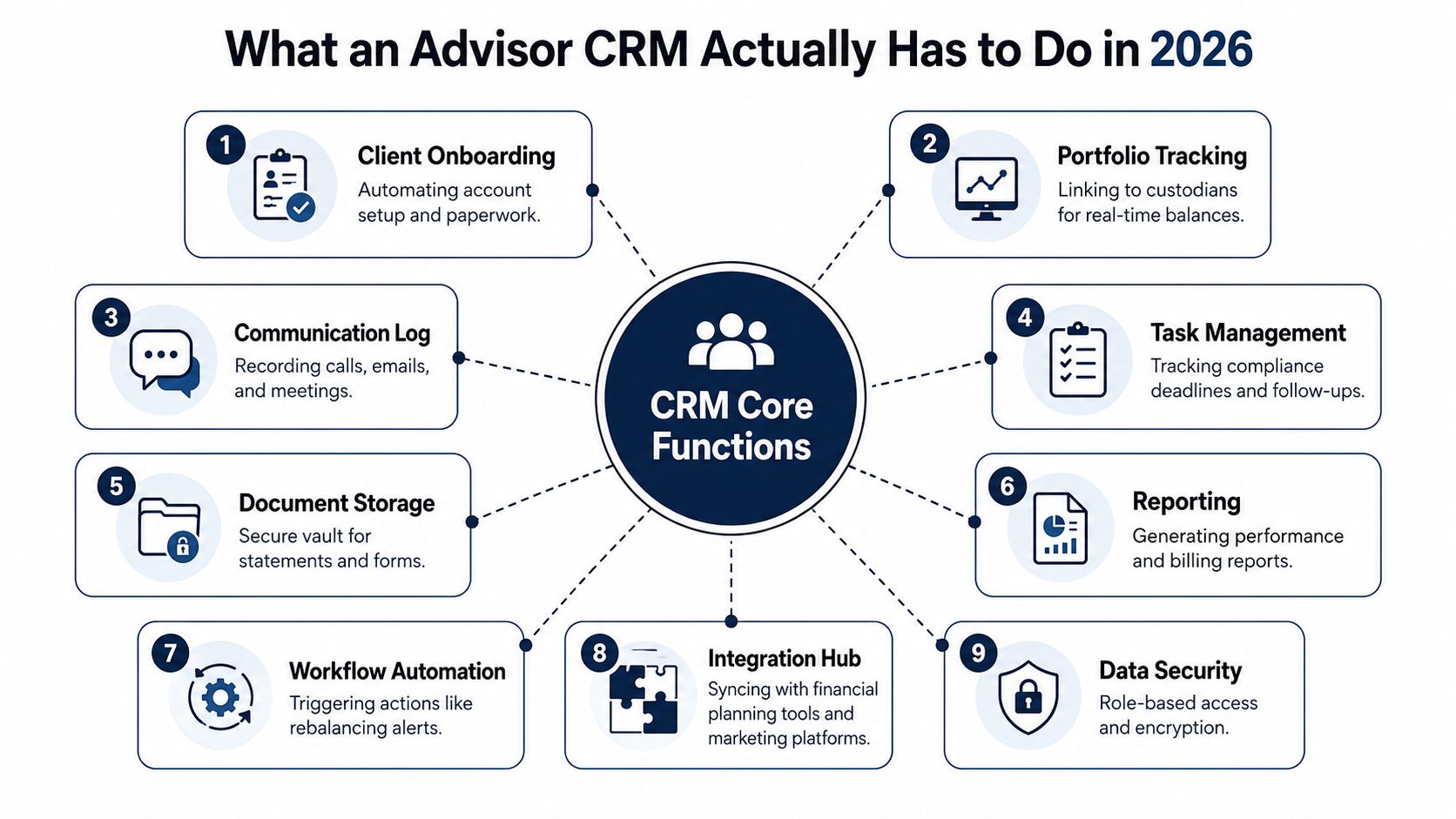
Security, mobile access, reporting, and emerging AI matter too, but they only matter if the foundation is sound. A CRM should let a traveling advisor update a record from a phone, show the service team what is due next, and surface useful next steps without creating another layer of software sprawl. The buyer who sees that picture clearly will ask much better questions in every demo. For a useful lens on pipeline and lead discipline, pair CRM thinking with B2B demand generation strategies, because the same process rigor that supports marketing also supports advisor operations.
The Nine Functional Categories That Separate Real Advisor CRMs
A CRM demo gets serious fast when you stop asking about feature lists and start testing whether the system can run real advisory work. A platform either fits the firm's daily operating rhythm or it creates more cleanup than value. The nine categories below separate a working advisor CRM from a polished interface that falls apart once a team starts using it.
Use a scorecard, not a vibes test
| Category | What It Must Do | Key Buyer Question |
|---|---|---|
| Householding | Group family units, related professionals, and linked entities | Can one household show the full relationship map cleanly? |
| Compliance log integrity | Preserve notes, emails, and meeting history in a reviewable record | Can the team retrieve the full client history without extra tools? |
| Onboarding workflow | Move prospects from discovery to funded accounts | Does the process support each stage without manual patchwork? |
| Integration breadth | Connect planning, portfolio, e-signature, document, and billing tools | Which systems sync natively, and what still needs manual entry? |
| Automation | Trigger tasks, reminders, and recurring service steps | What routine work disappears after setup? |
| Reporting and pipeline | Show service load, follow-up status, and business development visibility | Can managers see what's stuck before it becomes a problem? |
| Security and permissions | Control access by role and preserve sensitive data | Can permissions be configured without breaking usability? |
| Mobile access | Let advisors update records in the field | Is the mobile experience actually usable, or just a stripped-down afterthought? |
| AI features | Summarize notes, suggest next actions, and flag life events | Does the AI help the workflow, or just decorate the interface? |
A strong buyer makes every vendor walk through the same four workflows. Household creation. New client onboarding. A review meeting follow-up. A manager dashboard that shows service load and pipeline. If a platform handles one of those cleanly and three of them awkwardly, the firm is buying partial capability, not a durable operating system.
The scorecard also exposes a deeper truth. Data quality is not a software feature, it is a governance habit. Industry best-practices guidance emphasizes detailed workflows and consistent usage across the firm, with validation rules, periodic audits, and monitoring for missing or stale records. That is the standard. A CRM only becomes valuable when the team treats it as the source of truth.
The best demo question is simple, “Show the workflow exactly as a service associate would use it after a busy morning.”
For firms evaluating emerging AI, the question should be tighter. Does the feature reduce manual work inside the client process, or does it only sound impressive in a demo? A useful starting point is an analysis of AI tools for financial advisors, then compare that promise against how the CRM handles note summaries, next steps, and review preparation. In advisor CRM, AI is either a workflow multiplier or a distraction, and the difference usually comes from setup and governance, not the marketing copy.
Three Vendor Archetypes and Where Each One Wins
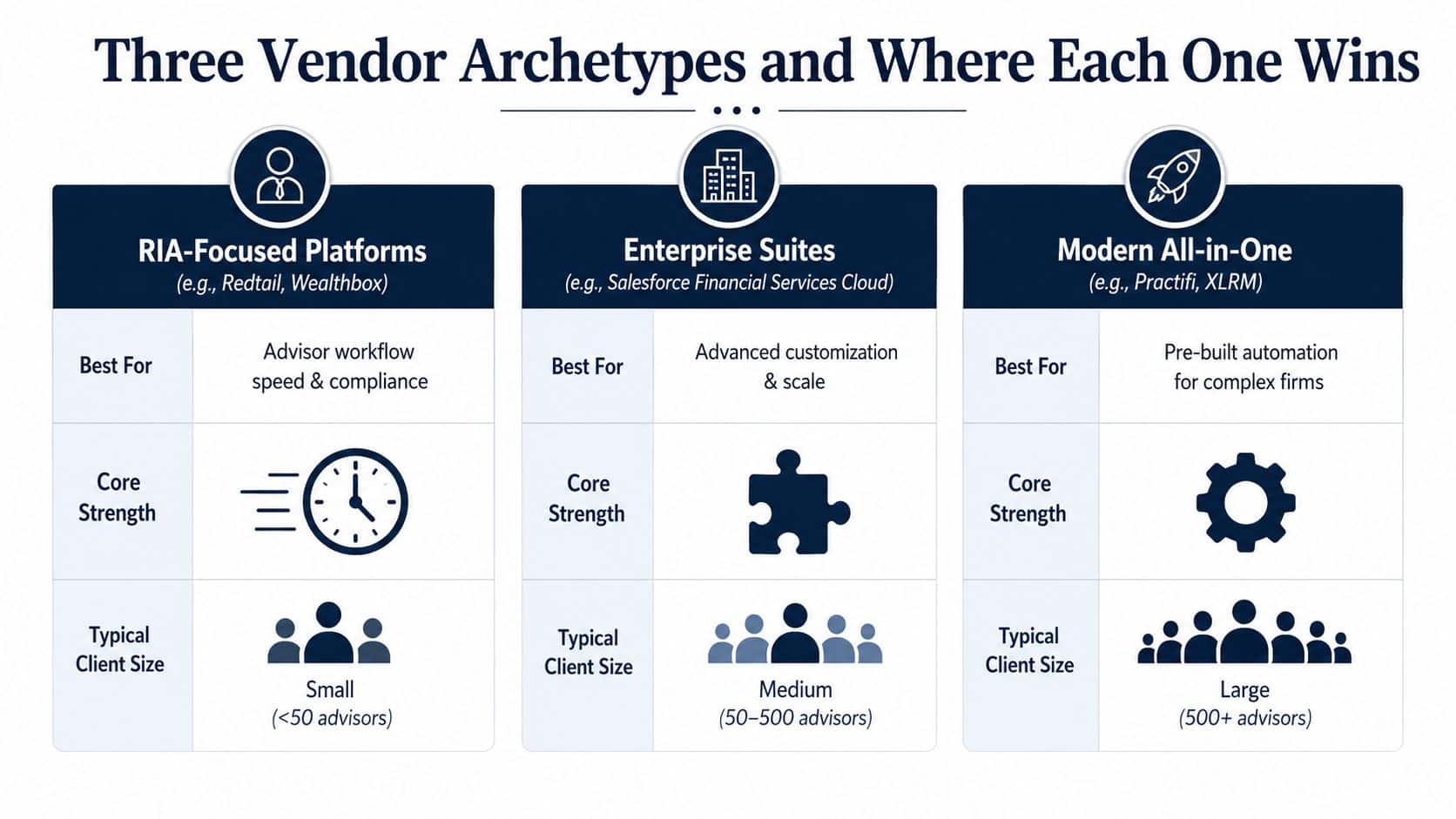
A lot of CRM buyer confusion comes from comparing platforms that were never built to solve the same problem. The better way to think about the market is by archetype. One group is optimized for advisor workflow speed. Another sits inside broader institutional stacks. The third offers maximum customization for firms with the internal capacity to manage it.
The tradeoff is speed versus control
| Archetype | What It's Best At | Typical Buyer Profile | Main Failure Mode |
|---|---|---|---|
| RIA-focused platforms | Quick onboarding, advisor usability, compliance-oriented workflows | Small and mid-sized advisory teams | Outgrowing the customization ceiling |
| Bank-integrated platforms | Fit inside custodial and back-office technology stacks | Bank and credit union wealth teams | Slower change cycles and heavier dependency on internal IT |
| Enterprise general-purpose platforms | Deep tailoring, segmentation, and process control | Complex, multi-entity firms with technical support | High implementation burden and user fatigue |
The pricing conversation gets real fast. Enterprise-grade platforms sit at the top of the capability curve, and they usually carry the heaviest implementation load. Mid-market advisor CRMs typically range from $39 to $80 per user per month, which is a very different buying decision from an enterprise stack built for complex process control and broad customization. Industry comparison reports consistently show the same pattern. The more flexibility a platform gives you, the more discipline it demands from the firm.
The simplest rule is this. If the firm needs broad automation and low-code tailoring for complex client-service processes, the enterprise route makes sense. If the firm needs advisor-friendly usability and quick rollout, the mid-market advisor route is usually the better fit. If the firm is inside a large institution with custody, compliance, and back-office overlap, the CRM should fit that stack, not fight it.
Bottom line: the wrong archetype usually fails by adoption friction, not by missing one flashy feature.
The source of the mismatch is easy to spot. Firms often buy for future complexity instead of present workflow. That turns the CRM into a long implementation project before the team has even built one clean onboarding path. When the buyer recognizes the archetype first, the shortlist gets a lot shorter.
Migration, Implementation, and the Adoption Problem Nobody Talks About
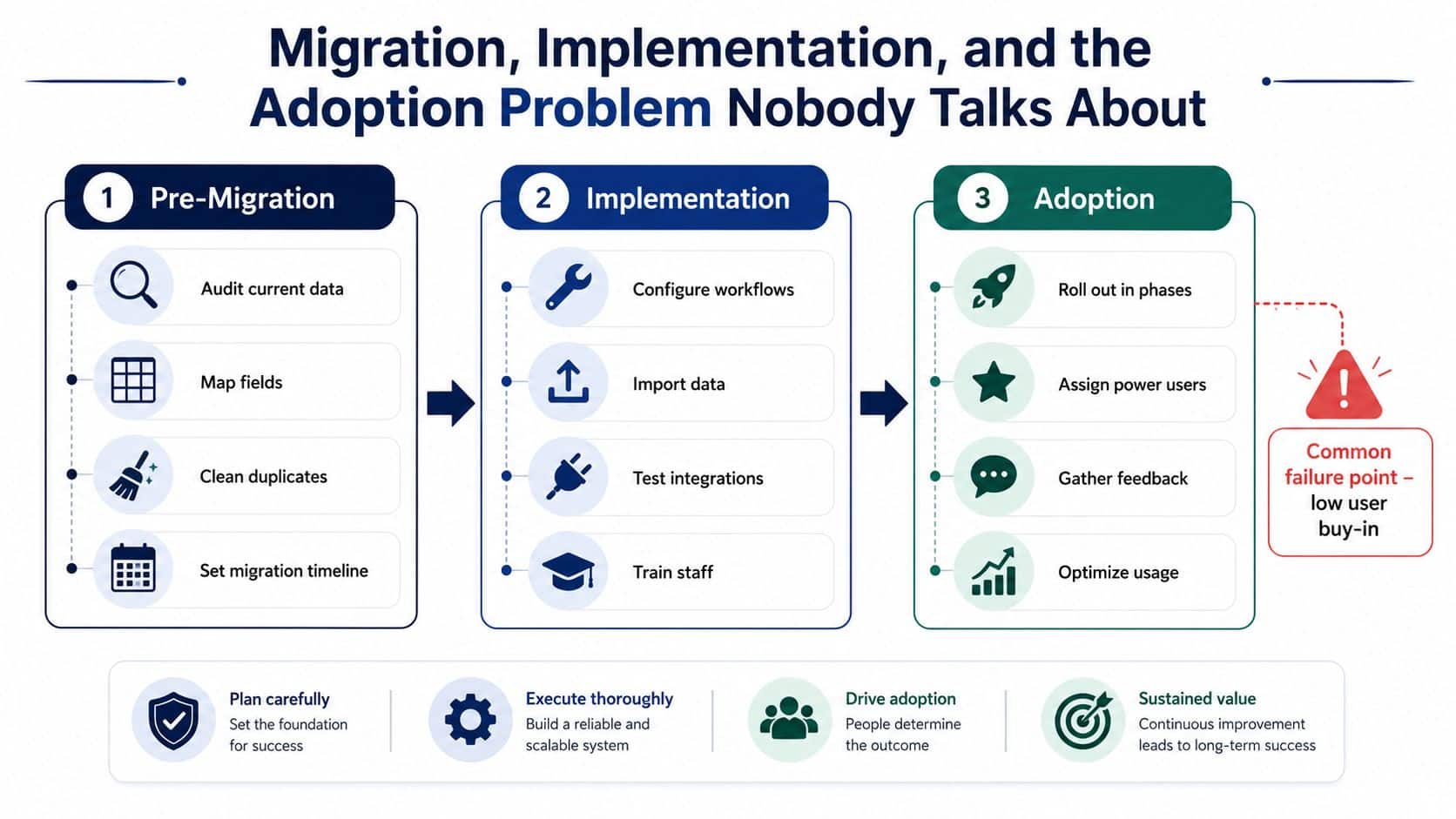
Most CRM projects do not fail at selection, they fail after the signature. Data gets migrated, a launch email goes out, and then the team slips back into spreadsheets, inboxes, and side notes. The problem is usually not the software by itself. It is the lack of rollout discipline, clear ownership, and a process that people can follow.
Start with clean data, not a fast cutover
The first mistake is importing dirty records and hoping the new system will fix them. It will not. Before migration, the firm should audit current data, map fields, remove duplicates, and decide what history is worth carrying forward. That work is not glamorous, but it keeps the new CRM from inheriting years of sloppy structure and bad habits.
Implementation should be tested in a sandbox before it touches production. Custodian links, planning integrations, permission settings, and workflow rules need to be validated before users touch the live environment. A CRM rollout that skips this step usually creates support noise that the firm mistakes for user resistance.
Operational truth: users do not reject a CRM because they hate change. They reject it when bad setup makes simple work harder.
Adoption is where the real work lies
The adoption phase needs its own plan. The firm should roll out in phases, assign power users, collect feedback, and review stale records and missing fields on a recurring basis. Independent implementation guidance consistently returns to the same point, consistent use and documented procedures create value, not feature breadth.
Training also has to match roles. Advisors need to know how to log meetings and next steps quickly. Service associates need task queues and record hygiene rules. Managers need dashboards that show where pipeline or service work is stuck. If everyone gets the same generic training, no one gets enough depth to use the system well.
Firms moving from an incumbent CRM often underestimate the emotional part of the switch. Any migration guide worth reading, including surviving a Dynamics 365 move, makes the same practical point, migration succeeds when the team expects disruption and manages it in phases. That is not glamorous advice, but it is the advice that keeps a six-month rollout from turning into a quiet rollback.
Matching the Right Platform to Your Firm Type
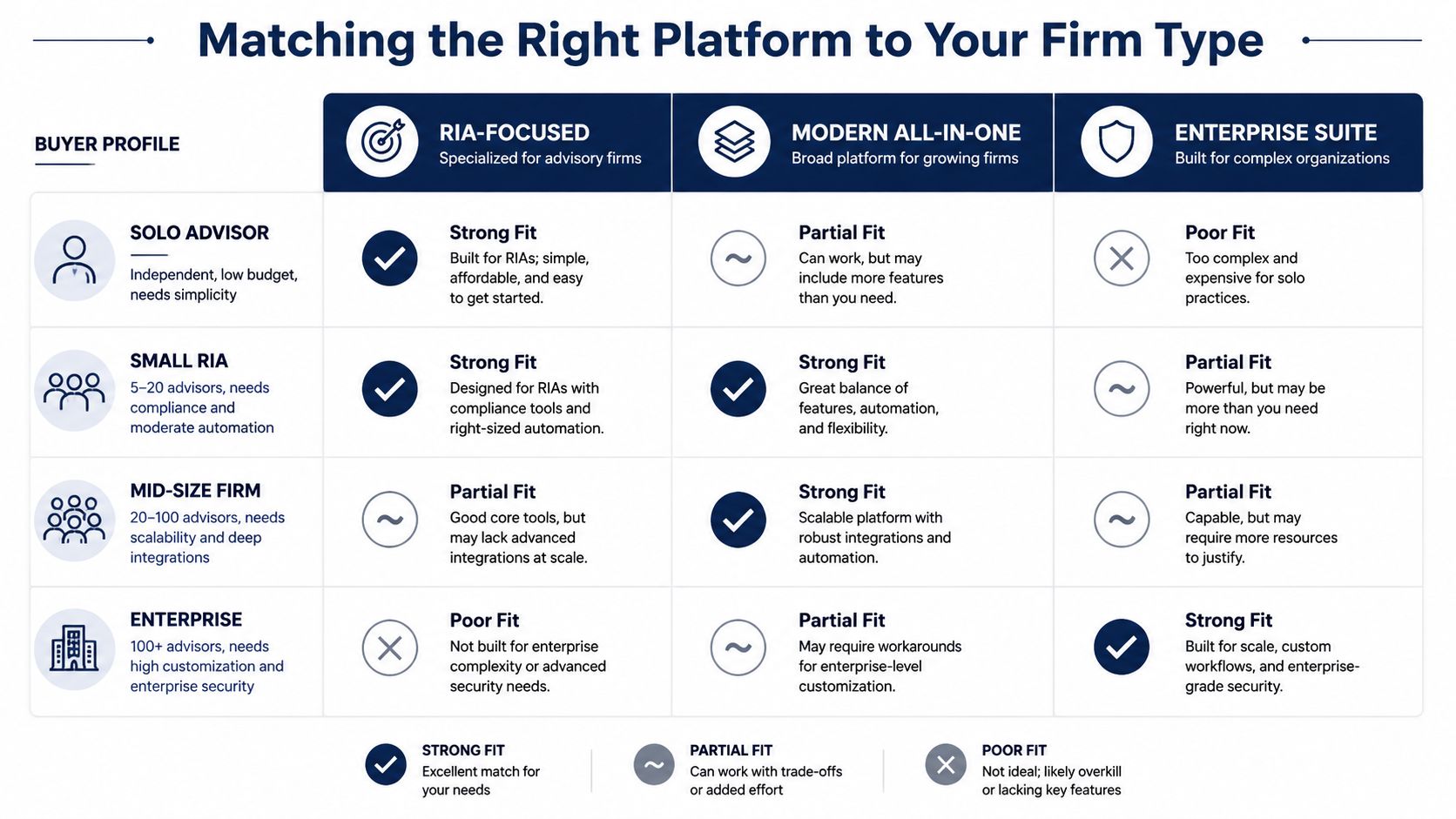
The cleanest buying decision comes from firm type, not platform hype. A solo advisor, a growing RIA, an enterprise firm, and a bank wealth team all need different levels of structure, integration, and admin control. The wrong recommendation in any of those cases usually creates more internal work, not less.
Buy for the next operating reality
| Firm type | Best fit | Why it fits |
|---|---|---|
| Solo advisor | RIA-focused platform | Keeps setup simple and avoids unnecessary admin burden |
| Small RIA | RIA-focused platform or modern all-in-one | Balances compliance, automation, and usability |
| Mid-size firm | Modern all-in-one or enterprise suite | Better for deeper integrations and stronger workflow control |
| Enterprise | Enterprise suite | Supports customization, permissions, and complex governance |
| Bank or credit union team | Bank-integrated platform | Works best when it has to coexist with a broader institutional stack |
For a solo advisor, the priority is speed. The CRM has to be easy enough to use daily without making service work feel like data entry homework. The budget should stay tight, and the integrations should cover the basics without requiring a consultant to keep the lights on.
For a multi-advisor RIA between roughly $200M and $1B in AUM, the answer changes. Standardized workflows, shared service visibility, and role-based permissions start to matter more than the smallest possible price. That's the point where firms should compare advisor-focused platforms with modern all-in-one systems and pressure-test how well each one handles growth.
An enterprise RIA or hybrid firm above $1B in complexity usually needs strong customization, deeper process control, and more formal governance. A bank or credit union wealth team has a different constraint entirely, because the CRM has to coexist with a larger institutional stack and operate within established permissions and reporting rules. For those buyers, the best CRM is the one that fits the environment cleanly, not the one with the slickest pitch.
A useful internal checklist for this decision is available in Advisor Momentum's practice management guidance, especially if the firm is tying CRM selection to broader operating changes. The key idea is simple. The CRM should support the firm's current scale and the next layer of complexity, not an imaginary future three reorganizations away.
Pricing, Hidden Costs, and a Simple ROI Model
Sticker price is the easiest number to compare, and also the least useful one. CRM cost lives in the subscription, the setup, the integrations, the training, and the time your team spends getting the system to fit real work. Firms that only compare per-user pricing usually underbudget the project and then blame the software when adoption stalls.
Visible costs are only part of the bill
The subscription is the line item everyone sees first. Enterprise platforms at roughly $300 per user per month sit at one end of the market, while mid-market advisor CRMs typically range from $39 to $80 per user per month. That spread matters, but it does not tell you what the implementation will cost. AltaStreet's 2025 CRM comparison for financial advisors
Budget pressure comes from everything outside the license. Data cleanup, migration mapping, custodian and document-system integrations, workflow configuration, training by role, and post-launch admin time can easily become the larger cost. If the firm needs custom fields, approval steps, or permission design, the bill goes up again. Even smaller add-ons matter, including things like secure video sharing costs if client communication is part of the workflow stack.
Implementation is where many CRM projects lose discipline. Teams underestimate how much time it takes to clean old records, rebuild household structures, and decide which fields are mandatory versus optional. They also forget the opportunity cost of pulling service staff, advisors, and operations people away from client work to test, correct, and retest the system. That lost time is part of the price.
For ROI, start with time saved on recurring work. If the CRM reduces manual onboarding tasks, review prep, follow-up logging, and internal chase work, the payback is easier to defend. If it only stores notes better than the old system, the economics are weak. Advisory firms should judge the business case against the hours recovered, the service capacity gained, and the reduction in rework.
ROI rule: if the CRM only stores information, the payback will disappoint. If it removes recurring work, the math starts working.
Build the business case around outcomes
A useful ROI model ties the CRM to four outcomes. Faster onboarding. Better prospect follow-up. Less compliance cleanup from incomplete records. More consistent service that supports retention. Those are the metrics that matter to an owner or executive team because they connect directly to revenue, capacity, and risk.
The hidden cost most buyers miss is adoption support. A firm may pay for configuration once, but it pays for training, reinforcement, and process enforcement every time a new advisor joins, a service team changes, or a workflow gets revised. That is why the cheapest subscription can become the most expensive system in practice. A CRM that fits the operating model and gets used daily beats a richer system that sits half-empty.
The right question is not whether a platform is cheap. It is what has to happen for the investment to pay back inside the first year. If the answer depends on consistent usage, clean data, and real workflow discipline, then the buying decision is really about management, not software.
Next Steps, Action Plan, and Common Questions
The cleanest way to move forward is to break the decision into 30, 60, and 90 day milestones. That keeps the project from turning into an endless evaluation cycle. It also gives the firm a way to judge whether the CRM is improving operations or just creating more administrative noise.
A simple 30, 60, 90 day plan
Days 1 to 30: align internally on the top three workflows the CRM has to support, assign a decision owner, and create a shortlist that matches firm type and technical capacity. This is also the time to define required integrations and essential security rules.
Days 31 to 60: run demos against real workflows, not generic tours. Ask for a household record, an onboarding workflow, a review follow-up, and a manager dashboard. Then check references from firms with a similar service model and level of complexity.
Days 61 to 90: negotiate the contract, finalize the migration plan, and launch the first two workflows in production. Keep the scope small enough to get adoption traction quickly. A CRM that works for two workflows is better than one that promises everything and lands nowhere.
The right time to upgrade is usually obvious. Multi-custodian complexity, recurring compliance findings, or a pipeline that never turns into clean client growth are all signs that the current system has become a drag. A firm does not need more software just because the market is crowded. It needs a system that makes the existing team faster and more consistent.
Common questions
Does a CRM alone satisfy SEC books and records requirements? No. A CRM helps with logging and organization, but compliant archiving and retention still need to be designed correctly across the broader recordkeeping stack.
How should AI features be vetted before rollout? Ask whether the AI is native, whether it connects to compliance logging, and whether advisors can use it inside the normal workflow. If the feature creates another place to check, adoption will fall.
How long does a typical migration take? The answer depends on data quality, integration depth, and how much process redesign the firm is doing at the same time. A simple move is very different from a full operating change.
Can a firm switch from an incumbent CRM without disrupting client service? Yes, but only if migration happens in phases and the firm expects short-term friction. The team should preserve service continuity first, then expand usage after the initial workflows are stable.
Advisor Momentum helps firms make that kind of decision with less guesswork. For RIAs, planners, and banking teams that want CRM selection tied to real workflows, better adoption, and cleaner client service, Advisor Momentum is built for exactly that kind of practical, compliance-aware execution.
