

An advisor can spend days recording a clear market update, routing the script through compliance, selecting a polished frame, and building a carefully segmented campaign. Then the email reaches an inbox where the video doesn't play, the thumbnail loads slowly, or the recipient clicks an image that doesn't match the landing page. The campaign hasn't failed because video lacks value. It has failed because the watch-to-click path wasn't designed around inbox limitations, accessibility, deliverability, and regulatory review.
For financial advisors, email with video works best as a click-to-watch conversion asset, not as a promise of universal inline playback. The strongest campaigns connect a concise message, a compliant preview, a fast hosted page, and measurement that separates curiosity from qualified engagement. That approach preserves video's persuasive value without asking every inbox, device, or reviewer to support a fragile experience.
Table of Contents
- Why Video in Email Matters for Financial Advisors
- Three Approaches to Embedding Video in Email
- Technical Implementation and Hosting Best Practices
- Deliverability and Analytics That Actually Matter
- SEC Compliance and Regulatory Considerations
- Subject Lines, CTAs, and Accessibility Best Practices
- Ready-to-Use Templates and Sample Workflows
Why Video in Email Matters for Financial Advisors
A registered investment advisor sends a short educational video to prospects who downloaded a retirement planning guide. The subject line identifies the video, the thumbnail shows the advisor speaking beside a simple chart, and the call to action invites recipients to watch the full explanation. Some recipients click immediately. Others read the accompanying text and return later. Compliance can review the script, thumbnail, landing page, and disclosures as one connected asset instead of treating the email as an isolated creative experiment.
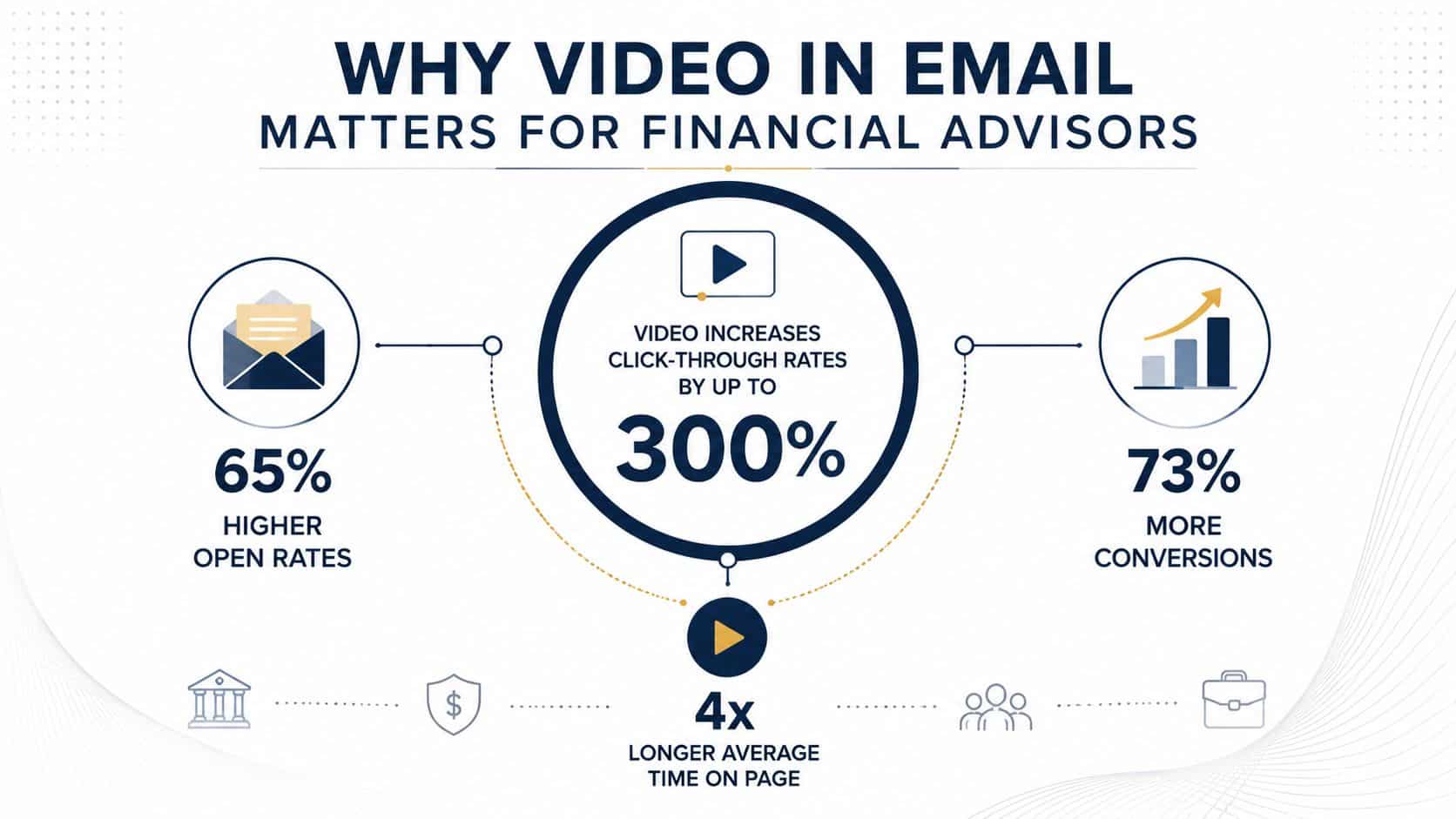
The commercial case is clear. Independent industry summaries report that emails containing video can improve click-through rates by about 65% and reduce unsubscribe rates by 26%. The same research line reports a 7% to 13% open-rate lift when the word “video” appears in the subject line, which matters because the subject line often determines whether a recipient notices the message at all. These findings are summarized in independent measures of the benefits of video email.
Why the tactic has matured
Video no longer sits at the edge of a financial marketing plan. A 2026 industry roundup reports that 48% of companies use email to share their videos, while 93% of marketers view video as an important part of their marketing strategy and 37.1% plan to increase video investment in 2026. Those figures describe a distribution channel that has moved beyond novelty, although the source presents the 2026 investment figure as a report about that year rather than a timeless benchmark. The same roundup cites a consumer benchmark in which 85% of people feel ready to buy after watching a video, reinforcing why video can help explain a complex, high-consideration service. See the video email marketing statistics roundup for the referenced benchmarks.
Financial advice has an unusual trust requirement. Prospects need to understand an advisor's approach, but the firm can't use persuasive storytelling as an excuse for unsupported promises, selective examples, or casual performance language. A video can create familiarity quickly, yet every visual, spoken statement, caption, and landing-page element may require review.
Practical rule: Treat the video, email, thumbnail, landing page, and tracking plan as one compliance-reviewed campaign.
Advisors building a broader video system can also examine financial advisor video marketing for ways to repurpose educational material across channels. Content repurposing can help a firm create email previews from approved long-form footage, and resources on AI content repurposing beyond Opus Clip can help teams evaluate that workflow without assuming every generated edit is ready for publication.
The opportunity, then, isn't just higher engagement. It's a more useful pre-click signal. A qualified prospect who clicks a relevant explanation has shown a different level of interest from someone who opens a subject line and leaves. The campaign becomes valuable when the firm can move that interest into an appropriate next step, such as a consultation request, educational resource, or compliant onboarding path.
Three Approaches to Embedding Video in Email
A prospect opens an advisor's email on a phone, sees a video preview, and taps it expecting a clear explanation. Whether that experience works depends on the inbox, device, security settings, and the firm's fallback plan. For regulated advisors, the practical goal is usually a reliable click to a reviewed viewing page, not universal playback inside the message.
“Video in email” describes three different technical experiences. An animated GIF preview plays within the message, but it can be heavy and visually limited. A linked thumbnail displays as an image and sends the recipient to a hosted player. Native embedded video may feel smooth where supported, yet inconsistent support makes it a poor default for broad RIA or wealth-management distribution.

The operational comparison
| Method | Email Client Support | File Size | Compliance Review | Best For |
|---|---|---|---|---|
| Animated GIF preview | Broad visual support, but playback and frame behavior vary | Can become large as frame count and resolution increase | Review the animation, text, frames, and fallback | A short visual tease when motion adds meaning |
| Linked thumbnail | Broad support because the email contains an image link | Usually lighter than a full video asset in the email | Review email, thumbnail, destination, disclosures, and tracking | Most regulated advisory campaigns |
| Embedded player | Limited and inconsistent support across inboxes | Depends on implementation and hosting | Requires review of multiple rendering outcomes and fallbacks | Controlled audiences with strong technical testing |
A linked thumbnail generally gives RIAs and wealth managers the best operating balance. The email stays lighter, the player remains on a page the firm controls, and that page can present disclosures, captions, transcript content, and an appropriate next action. It also gives compliance reviewers a defined email-to-page journey rather than several possible inbox experiences.
An animated GIF can support a topic when motion adds meaning, such as a simple transition from a title card to an advisor's face. It should not carry information that the recipient must see, because some inboxes may display only the first frame. Supporting text must explain the message without relying on animation. Teams working on fallback behavior for motion assets can review guidance on email signature GIF fallback strategies, then apply the same principle to campaign previews.
Motion should strengthen the preview, not become the only way to understand it.
Why native playback creates friction
True inline playback can vary by inbox, device, security configuration, and rendering engine. One test environment may show a polished player, while another shows a static fallback, a broken element, or a download behavior. Reviewers therefore need to assess multiple outcomes, including what recipients see when playback fails.
File size adds another constraint. Many email clients and email service providers cap attachments around 20 to 25 MB, and embedded playback is not supported consistently. Guidance on including video in email campaigns recommends a short teaser of 15 to 60 seconds, a clear CTA near the thumbnail, and testing across desktop, mobile, and multiple clients. The operational choice is straightforward: send a preview, host the full experience elsewhere, and make every fallback understandable.
Native embedding can suit a tightly controlled internal audience with strong technical testing. Broad prospect or client campaigns usually gain a cleaner review process and more predictable click behavior from a linked thumbnail.
Technical Implementation and Hosting Best Practices
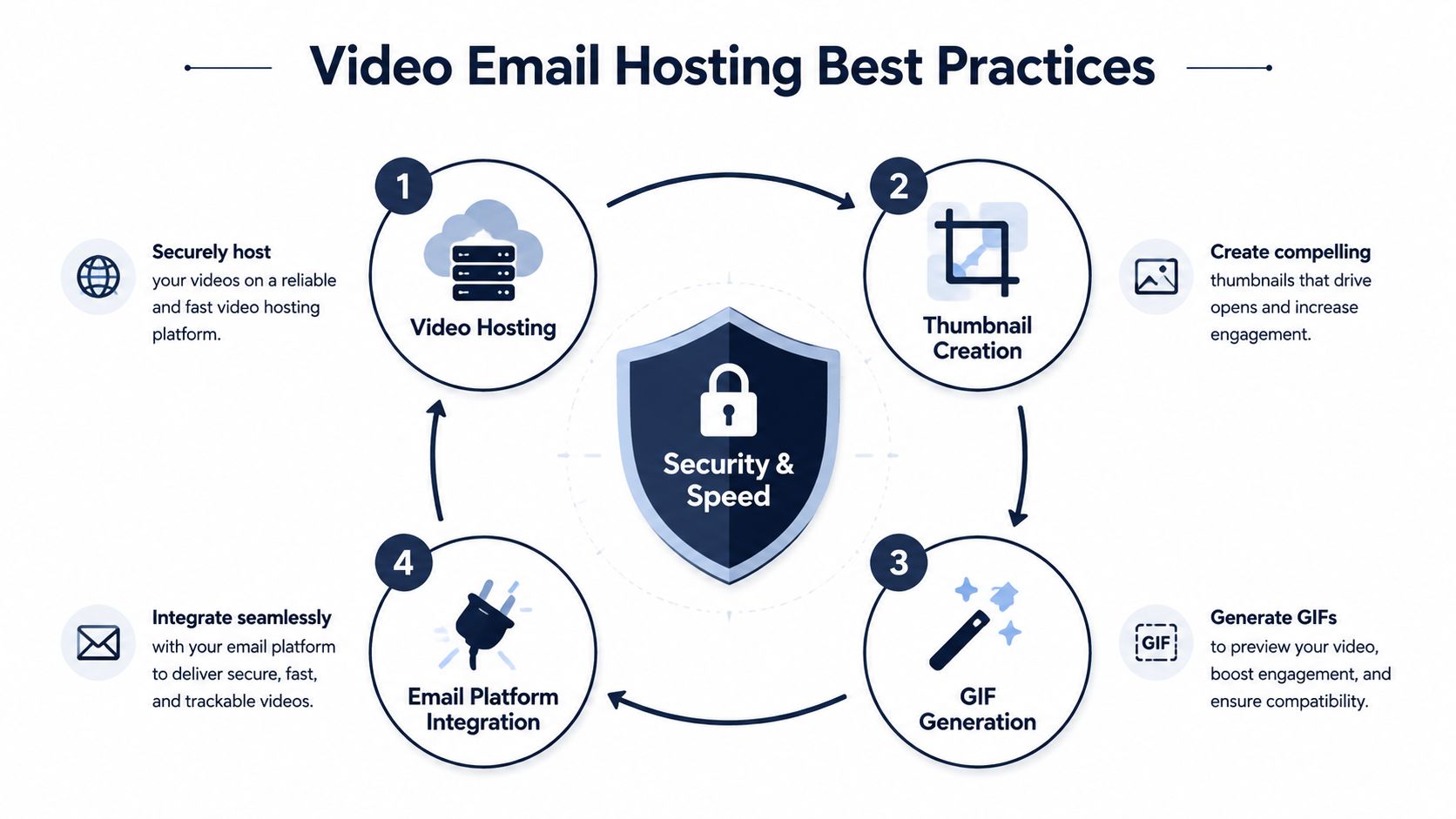
A reliable email with video starts with the destination page, not the email editor. The hosted page should load quickly, use a secure connection, display the same title and visual language as the email, and place the video near the top of the page. If the recipient clicks a thumbnail promising a market update but lands on a generic resource library, the campaign loses momentum and the click becomes difficult to interpret.
Build the destination before the creative
The page needs a clear purpose. For a market commentary, that purpose may be watching the explanation and requesting a follow-up. For client education, it may be completing a related resource. The page shouldn't bury the player beneath unrelated navigation, a long introduction, or competing offers.
Use a thumbnail that accurately represents the footage. A face, topic label, and recognizable play button can communicate the promise quickly, but the image must not imply a claim the video doesn't support. The landing page should repeat the subject and use the same thumbnail or a closely related frame, so the recipient knows the click led to the expected content.
Keep the email lightweight
The email should contain a linked image, not a large attachment. The preview can include a short animated sequence, but a static image remains essential for clients that block animation or strip unsupported elements. The CTA should appear beside or immediately below the thumbnail, with language that matches the actual next step, such as Watch the retirement income explanation rather than a vague invitation to “Learn more.”
A practical production sequence looks like this:
- Host the approved video: Place the full asset on a secure, mobile-friendly page with captions and an accessible text alternative.
- Create the preview: Select a frame that reflects the video's actual subject, then add a visible play treatment without obscuring important information.
- Add the fallback: Include static image alt text, surrounding copy, and a meaningful link label so the email remains useful without motion.
- Connect the CTA: Point the thumbnail and button to the same destination unless there's a deliberate reason to separate them.
- Test the complete path: Review desktop and mobile rendering, image blocking, dark-mode behavior, link destinations, page speed, captions, and tracking.
Rendering insight: A preview that loads perfectly but leads to a slow or mismatched page still damages conversion quality.
The most common failures are ordinary. The thumbnail may show a frame from an old version of the script. The page may require extra navigation before playback. Captions may be absent. Alt text may say “image” instead of explaining what the recipient can do. Each issue adds friction for a prospect and creates another question for compliance or operations.
Deliverability and Analytics That Actually Matter
A regulated advisor can see more thumbnail clicks after adding video, yet still receive fewer qualified conversations if the preview overpromises or the destination creates friction. Opens provide limited guidance because privacy controls, image loading, and security scanning can distort the signal. Track the recipient's path from delivery to thumbnail click, video start, meaningful viewing, and approved follow-up.
Industry benchmark reporting has associated video email with 19% higher open rates, a 65% click-through lift from video thumbnails, and a 6% lift when the subject line includes the word “video.” Other aggregate reporting cites approximately 10.3% CTR for emails with embedded video thumbnails versus 6.1% for static images, plus a 9.1% conversion rate versus 5.4% for non-video emails. Treat these figures as testing references, not promises for advisor campaigns.
Separate the signals
A useful dashboard assigns one question to each metric:
- Delivery and bounce behavior: Did the message reach the intended audience without creating sender or list-quality concerns?
- Click-through rate: Did the subject line, copy, and preview earn a visit?
- Play rate: Did visitors start the video on the hosted page?
- Engagement depth: Did they watch far enough to encounter the main explanation or CTA?
- Downstream conversion: Did they complete the approved action, such as requesting a conversation?
- Qualified follow-up: Did the contact fit the firm's audience and enter the correct workflow?
A thumbnail can raise clicks without increasing qualified conversations when curiosity outweighs relevance. A focused educational topic may draw fewer visits but produce stronger follow-up. Judge performance across the stages, not by one percentage.
Deliverability adds a separate constraint. Email clients do not consistently support inline playback, and animated or media-heavy elements can increase rendering and filtering risk. A linked thumbnail makes the email a click-to-watch asset, while a static fallback preserves access when images are blocked. The trade-off is clear: the campaign gives up immediate playback in exchange for more predictable delivery and rendering.
Teams building a measurement framework can review broader guidance on boost engagement with revid.ai, then adapt the measures to financial services. The dashboard should connect email activity with the firm's financial advisor email marketing process, including segmentation, lead routing, consent records, and compliant follow-up. That connection shows whether video contributed to a qualified action, rather than merely producing a higher click count.
SEC Compliance and Regulatory Considerations
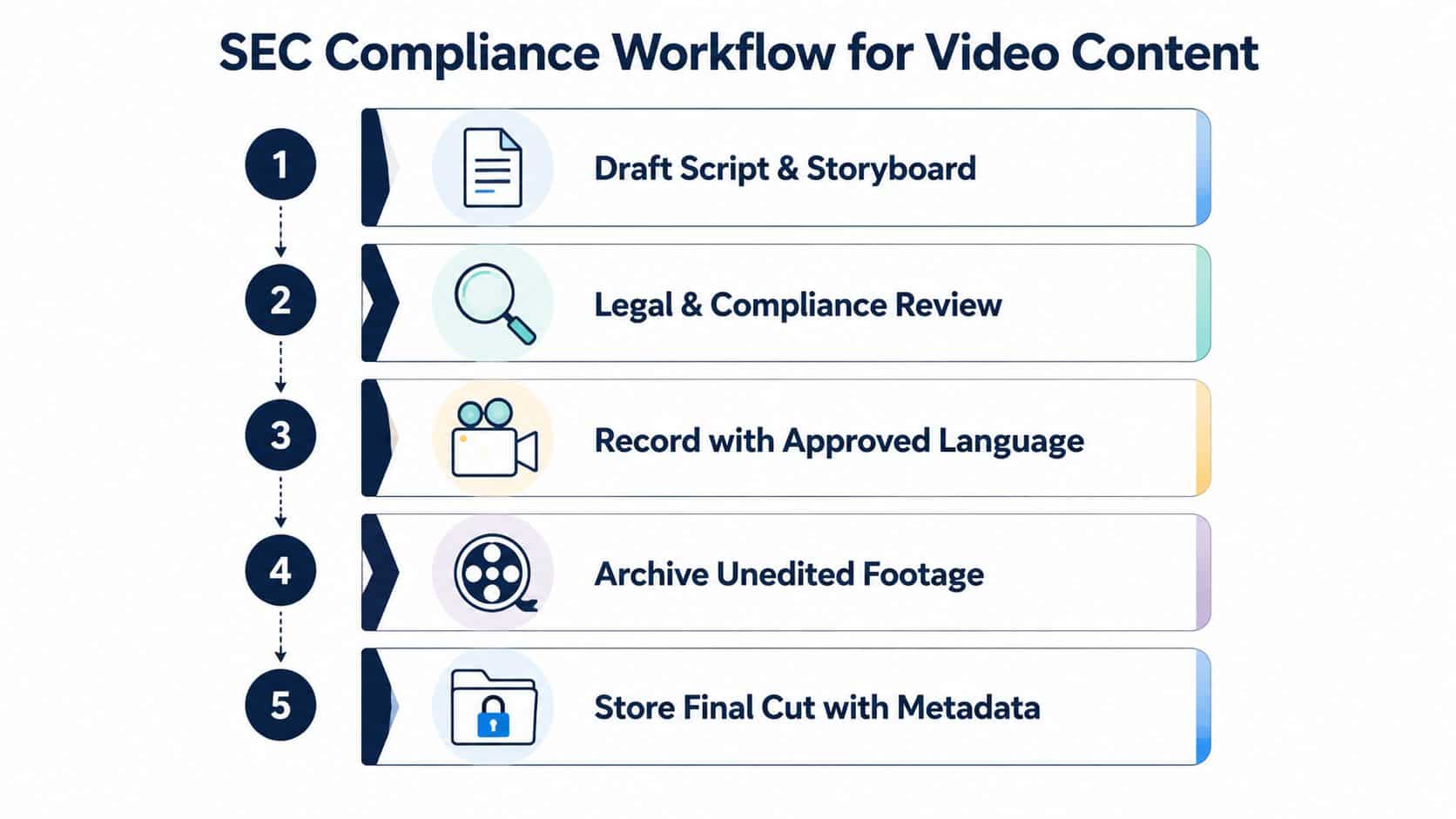
Compliance shouldn't enter the process after the video has been recorded. By that point, the advisor may have created language that can't be used, captured a client-related visual that requires permission, or built a thumbnail that communicates a stronger claim than the script supports. A compliance-first workflow moves review upstream, before production and before email assembly.
For an RIA or wealth manager, the review scope includes more than spoken words. The reviewer may need to assess on-screen text, charts, captions, music, testimonials or endorsements, disclosures, landing-page copy, calls to action, audience segmentation, and the final archived version. The email itself also needs review because its subject line and preview text can make claims independently of the video.
Use approved language as production material
A practical sequence begins with a brief, script, and storyboard. The compliance reviewer can flag unsupported outcomes, missing qualifications, comparative language, and potentially misleading visuals before anyone records. Once the language is approved, the presenter should follow the approved version closely rather than improvising claims during filming.
The firm should maintain a campaign record containing:
- The approved script and storyboard: Include version history and reviewer comments.
- The final email: Preserve subject line, preview text, body copy, thumbnail, links, and disclosures.
- The destination page: Archive the page as it appeared when the campaign ran.
- The media files: Retain the final cut, captions, transcript, and relevant unedited footage.
- The distribution record: Document audience criteria, send timing, approvals, and performance reporting.
Make disclosures visible and relevant
A disclosure hidden beneath an unrelated page element won't repair a misleading headline or visual. Placement should help the recipient understand the qualification at the point where the claim appears. If the video discusses investment risks, assumptions, hypothetical illustrations, or educational content, the surrounding email and destination page should present the relevant context clearly.
The record-keeping process should also account for edits. A new opening, thumbnail, caption, or CTA can change the communication even if the underlying video remains the same. Each material variation deserves its own review decision and archive reference.
Compliance position: The fastest campaign is usually the one that begins with a reviewable concept, not the one that rushes an unapproved recording into production.
This discipline supports credibility across web, social, and video channels. It also reduces avoidable review cycles because the creative team knows which language, visuals, disclosures, and destinations have already been cleared. Advisor Momentum's compliance-first services include content development and professional video production for financial advisors, which can be considered when a firm needs coordinated execution across those assets.
Subject Lines, CTAs, and Accessibility Best Practices
A prospect opens the email, scans the preview, and decides whether the promised video deserves a click before any player loads. Subject line, preview text, thumbnail, CTA, captions, and alt text must therefore make one consistent promise. A strong recording cannot compensate for a promotional subject line, an exaggerated thumbnail, or a button that leads to an unexpected page.
Using “video” in the subject line has been linked to a 6% lift in an earlier benchmark. Labeling the format when it helps recipients understand what they will receive is a low-friction way to improve open rates. For regulated advisors, the label should also match the asset and the destination page. Calling a short market explanation a “video” is clear. Calling it an “exclusive strategy” may create a claim that compliance must evaluate.
Write for a narrow decision
A subject line such as “Video: How the firm approaches retirement income” sets a clearer expectation than a broad promise about financial freedom. Preview text can identify the audience and purpose, while the email body gives one reason to watch. Narrow positioning reduces review friction because the message makes fewer claims and gives the recipient a defined context.
The CTA should describe the next step accurately:
- Watch the explanation: Use when the link opens directly to the player.
- View the market update: Use when the content is time-sensitive and clearly labeled.
- See the planning walkthrough: Use when the video demonstrates a process.
- Request a conversation: Use only when the destination and follow-up workflow support that action.
Treat the email as a click-to-watch asset rather than assuming reliable inline playback. A button that accurately describes the destination preserves trust when images are blocked, autoplay is unavailable, or the recipient reaches the video on a separate page.
Treat accessibility as part of conversion
Captions support recipients who cannot or do not want to use sound. A transcript provides a text alternative and gives the review team a searchable record of the spoken content. Alt text should describe the function of the linked image, such as “Watch the advisor explain retirement income planning,” rather than merely naming the asset.
The email must remain understandable if images are blocked. Place enough copy around the thumbnail to communicate the topic, use a descriptive link label, and keep required disclosures out of the image alone. The landing page should provide captions, a transcript or equivalent text, keyboard-accessible controls, and readable contrast.
Accessibility principle: If a recipient cannot see the preview or hear the video, the campaign should still communicate its purpose and next action.
Measure the click separately from the conversion. A recipient may click because the thumbnail is compelling, then leave because the topic is irrelevant or the destination is unclear. That result points to audience selection, message alignment, or landing-page work, not automatically to removing video.
Ready-to-Use Templates and Sample Workflows
A market update email can follow a compact structure:
Subject: Video: The firm's perspective on this market question
Body: “Recent market conditions have raised questions about [approved topic]. In this short video, [advisor name] explains the firm's framework and the factors clients may want to discuss with their planning team.”
Preview: Linked thumbnail with descriptive alt text.
CTA: “Watch the market explanation.”
Compliance elements: Approved disclosure, date or context label where needed, and a destination page containing the video, captions, transcript, and appropriate next step.
A client education message can use the same architecture with a different promise. The email might introduce a video explaining a planning concept, include one supporting paragraph, and invite the recipient to view the full walkthrough. It shouldn't combine several unrelated topics, because a narrow message makes the click easier to interpret and the campaign easier to review.
A production workflow that reduces rework
- Select the audience: Define whether the message is for prospects, current clients, or a specific educational segment.
- Draft the concept: Write the subject line, email copy, video script, thumbnail direction, CTA, and destination-page outline together.
- Review before recording: Send the complete concept to compliance, including claims, disclosures, visuals, and intended audience.
- Record and edit: Use approved language, retain the unedited footage, add captions, and create a final cut that matches the reviewed concept.
- Assemble the campaign: Build the email with a linked thumbnail, static fallback, alt text, and a fast landing page.
- Test the path: Check inbox rendering, mobile layout, image blocking, link behavior, page playback, captions, and analytics.
- Launch and evaluate: Review delivery, clicks, plays, engagement depth, conversions, and qualified follow-up.
A service introduction can use a direct but restrained CTA, such as “Watch how the planning process works,” followed by “Request an introductory conversation” on the destination page. The email shouldn't imply that watching guarantees an outcome or that a general explanation substitutes for individualized advice.
The workflow becomes more efficient when approved long-form recordings produce several controlled assets, including an email thumbnail, a short preview, a landing-page video, and a transcript. Each derivative still requires review, but the firm can manage versions from one documented source rather than creating disconnected content.
Advisor Momentum provides compliance-ready marketing, professional video production, email marketing, and conversion-focused digital services for financial advisors and wealth management firms. Visit Advisor Momentum to discuss a video email workflow that connects approved content, reliable landing pages, and qualified lead follow-up.
